


Fieldy - AI note taker
4.4132.00 Reviews
App Specs
- Version
- 2.40
- Updated On
- License
- Free
- Downloads
- 10,000+
- Developer
- Field Labs Inc
- Categories
- Lifestyle
- Platform
- Android
Screenshots
 Analysis by AppCompare
I judge a note-taking app less by how many clever features it promises than by whether I can get something useful from it when my attention is already split. That is the question I would bring to Fieldy - AI note taker: can it help me remember a conversation without making me manage another complicated system? Its focus on voice-led notes makes it an interesting option for people who think aloud, move between tasks, or struggle to write everything down in the moment. It is not a fit for every kind of note-taker, though, and its usefulness depends on how well its spoken capture works in the setting where you need it.
What voice-first notes change in a busy day
In an ordinary notes app, I usually have to stop, open a blank page, and decide how to structure what I am writing. A voice-oriented tool changes that starting point: I can focus on expressing the thought first and worry about finding it later. That difference matters most when an idea arrives while I am walking between appointments, or when a discussion contains more detail than I can comfortably type while listening.
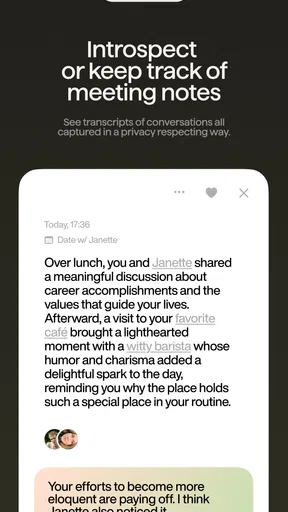
A realistic use would be a project check-in where I want to stay part of the conversation rather than stare at my phone. I could use Fieldy to capture the discussion, then revisit the resulting note afterward to identify a decision, a name, or a task I might otherwise have forgotten. I would still review the note before relying on it; automated recognition can preserve plenty of words while missing the emphasis that makes a sentence meaningful.
This is also where I would set a sensible boundary. I would not treat an automatically captured note as a perfect record or assume that every speaker’s point has been understood correctly. For a deadline, medical instruction, financial detail, or anything where a small transcription error could cause a real problem, I would check the important wording and confirm it with the person involved. The time saved during capture is useful, but it does not remove the need for judgement afterward.
Readability, navigation, and finding a note again
Fieldy is a lifestyle app from Field Labs Inc, and its appeal is less about building an elaborate filing cabinet than reducing the effort between having a thought and being able to retrieve it. In my experience, automatic organization and search are valuable only if I use them as a pair: I can let the app group material, then search for a distinctive word when I remember the subject but not where or when I recorded it.
A practical habit is to include a concrete term when speaking a note. “Call Jordan about the revised schedule” gives me more to search for later than “follow up on that.” This is not a special feature; it is a simple way to make voice-captured material easier to recover. If I routinely record vague fragments, automatic grouping cannot supply the details I never said.
That makes the app potentially useful for people who find typing tiring or who prefer speaking to composing. It may also suit someone who needs to revisit a trail of conversations rather than maintain a carefully formatted notebook. But anyone who depends on large, highly structured pages, precise visual layouts, or a specific personal tagging system should compare it with a conventional notes app before changing their routine. Search can rescue a lot, but it is not the same as having complete control over a document’s structure.
Worth Reading Before You Choose

EA SPORTS FC Mobile 26 Is a Bigger Football Game, but It Takes Time

Flipboard Shows What News Apps Must Do Beyond the Feed

Switching to Android Auto Means Rethinking Your Driving Routine

Google Calendar Makes a Crowded Week Easier to Manage

Ludo King Makes the Most of the Minutes Between Plans

Baby Panda World Brings Quick Play to Modern Phones, but Its Game Library Feels Busy
Motor and sensory considerations in real situations
Voice capture can reduce the need for sustained typing, which is a meaningful advantage when hands are occupied or repetitive input is uncomfortable. It can also help when a person can explain an idea aloud more easily than they can turn it into polished written notes. That benefit is situational, not automatic: speaking still requires a usable way to start and stop a recording, and the surrounding environment has to make speech practical.
For someone with limited speech, a speech difference, or fatigue that makes talking difficult, I would not assume voice recognition will be a reliable substitute for typing. The app’s general promise does not tell me how it will handle every voice or communication style, so I would test it with low-stakes notes before trusting it for something important. If typing, tapping, or reading the interface is the main barrier, a tool built around the person’s preferred input method may be a better choice.
Sensory context matters too. A quiet room can make speaking a note comfortable, while a shared office, busy café, or crowded bus can make the same action awkward. Speaking privately into a phone may draw attention, and background conversation can make recognition less dependable. I would choose voice capture for a calm, suitable moment and keep a quick text note or another discreet method available when speaking would be intrusive.
Where it fits beside familiar alternatives
Compared with a basic voice recorder, an AI note-taking approach is most appealing when I want something more useful than a long audio file to search through by replaying it. Compared with a standard text notebook, its advantage is capturing speech without requiring me to write continuously. Those are different trade-offs, not proof that one method is best for everyone: a recorder may suit someone who needs the original audio, while a text-first notebook offers direct control over wording and layout.
I would also keep a simple capture workflow rather than expecting the app to become my entire productivity system. For instance, I could record a conversation, review the note after the meeting, and transfer only the confirmed action items into the calendar or task list I already use. That extra review step keeps a transcript from turning into a pile of searchable but unresolved material. It is a useful distinction for anyone choosing between an AI assistant and a manual system: less effort at the moment of capture can mean a little more checking later.
Fieldy is free to download, with in-app purchases ranging from $4.99 to $179.99 per item. I would treat that range as a reason to try the basic experience first and decide what I actually need before paying for anything. Its average rating is 4.0 from around 411 ratings, with 82 written reviews, and it has over 10,000 installs. It was released on April 20, 2024, and version 2.29 is the current version. The app is rated for Everyone, but that age label does not answer practical questions about whether voice capture suits a particular person, setting, or privacy expectation.
One question I would ask before making it part of my routine is whether I can comfortably capture speech where I usually need notes. Another is whether I am willing to check important details afterward, especially names, numbers, and specialized terms. I would also consider whether I want spoken capture or a document I can shape as I go. If the answer is mostly the latter, a traditional notes app may be less friction overall; if it is the former, Fieldy’s approach may save effort at the moment I am busiest.
For occasional ideas, I would test it with a few short, low-stakes recordings in the places I actually spend time, then search for those notes later. That reveals more than a polished test in a quiet room: it shows whether I remember to use the app, whether speaking feels natural, and whether the resulting notes are clear enough to be useful. I would not begin by moving an entire archive or relying on it for a crucial meeting. A small trial lets me discover its fit without making a new tool another chore.
Getting Started with Fieldy
First things first, downloading and setting up Fieldy - AI note taker was a breeze. Available on both Android and iOS, the app quickly installed on my phone without any hitches. The user interface? Super clean and intuitive. You know how some apps feel like they need a user manual? Not this one. Everything's right where you expect it to be, which is a big win in my book.
Features That Stand Out
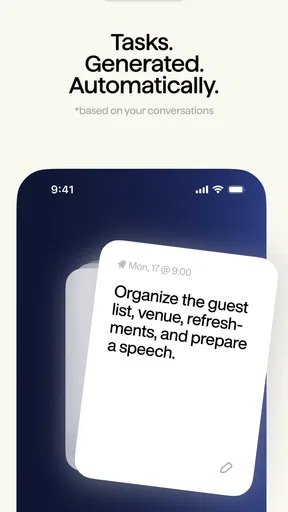
Alright, let's talk features because wow, this app has some neat tricks up its sleeve. The core of Fieldy is its AI-driven note-taking capability. Imagine being in a meeting and having an AI assistant jot down the key points for you. It uses voice recognition to capture everything, and folks, it’s surprisingly accurate. Even with my terrible habit of mumbling, it managed to capture most of what I said.
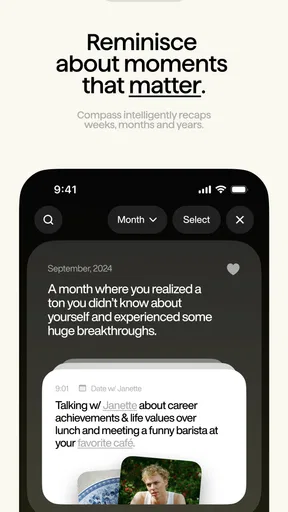
Another cool feature is the app's ability to organize notes automatically. It groups them by topic, date, or even by the people involved, which makes finding that one note from last Tuesday's brainstorming session a lot easier. Plus, there's a search function that works like a charm. Just type in a keyword, and you're good to go.
Real-Life Usage
So, how does Fieldy hold up in real-world scenarios? Pretty darn well, if you ask me. I tested it during a long team meeting, and it captured the essence of our conversation without breaking a sweat. Later, I used it during a lecture, and it kept up with the pace of the professor's speech. I even tried it while driving (hands-free, of course) to capture some thoughts, and it performed flawlessly.
One of my favorite things is the app’s ability to share notes seamlessly. You can send them to your teammates, export them as PDFs, or even sync them with other productivity tools like Google Drive or Evernote. It’s all about keeping everything connected, and Fieldy does it effortlessly.
A Few Things to Keep in Mind
Okay, so while I’m loving Fieldy, there are a couple of things I noticed. The AI, while generally spot-on, can occasionally miss context or misunderstand complex jargon. But hey, it’s learning, and updates seem to be rolling out regularly to improve accuracy.
The app also relies heavily on a good internet connection for its voice recognition and syncing features. So, if you're in a spotty Wi-Fi zone, you might experience some hiccups. But once you're back online, everything syncs up smoothly.
Final Thoughts
In conclusion, if you're looking for a smart, efficient way to handle your notes, Fieldy - AI note taker is definitely worth checking out. It’s like having a personal assistant in your pocket, ready to capture every idea you throw its way. Sure, it's not perfect, but it's pretty darn close for a tool that’s going to save you tons of time and effort.
So, give it a shot and let me know what you think. You might just find it becomes an indispensable part of your daily routine. Happy note-taking!
A thoughtful fit, not a universal one
For me, the most inclusive way to judge a voice-led app is to ask who can use it comfortably in their actual surroundings, not just whether the interface looks simple. Fieldy may be helpful when writing is the tiring part and speaking is easy, or when someone wants to preserve the flow of a discussion instead of typing throughout it. It is less convincing when speech is difficult, privacy is important, the environment is loud, or the user needs complete control over every line of a note.
I would recommend trying it with an everyday, low-consequence task and judging the result by two things: whether capture feels manageable, and whether the note is understandable when you return to it. If both are true, it can be a practical addition to a routine. If either fails, a regular text notebook, a dedicated recorder, or another input method may serve you better. That is the fairest way to approach Fieldy: as a useful option for particular needs, rather than a replacement for every way people take notes.
Pros
- Excellent voice recognition accuracy.
- Seamlessly integrates with other apps.
- Intuitive and user-friendly interface.
- Offers real-time transcription.
- Supports multiple languages.
Cons
- Requires a stable internet connection.
- Limited features in the free version.
- High battery consumption.
- Occasional lag during long sessions.
- Some accents may not be recognized.
FAQs for Fieldy - AI note taker
What is Fieldy - AI Note Taker and how does it work?
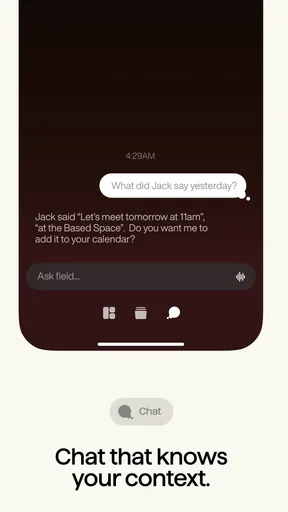
Fieldy - AI Note Taker is an intelligent application designed to help users efficiently capture, organize, and retrieve notes using AI technology. It transcribes spoken words into text and categorizes notes based on keywords and context. The app also integrates seamlessly with other productivity tools, enhancing its utility for both personal and professional use.
Is Fieldy - AI Note Taker compatible with both Android and iOS devices?
Yes, Fieldy - AI Note Taker is available for both Android and iOS platforms. The app can be downloaded from the Google Play Store and the Apple App Store, ensuring a broad user base can access its features. Regular updates are provided to maintain compatibility and introduce new functionalities.
How secure is Fieldy - AI Note Taker in terms of data privacy?
Fieldy - AI Note Taker prioritizes user privacy and data security. It employs encryption protocols to protect user data, ensuring that notes and transcriptions remain confidential. The app also complies with privacy regulations and provides users with options to manage their data, such as deleting stored notes permanently.
Does Fieldy - AI Note Taker require an internet connection to function?
Fieldy - AI Note Taker requires an internet connection for initial setup and for certain features such as real-time transcription and cloud synchronization. However, users can access saved notes offline, and the app will sync updates once a connection is re-established, providing flexibility for users on the go.
Are there any costs associated with using Fieldy - AI Note Taker?
Fieldy - AI Note Taker offers a free version with basic features, but premium features are available through in-app purchases or a subscription model. The premium version includes advanced functionalities such as enhanced transcription accuracy, additional storage, and integrations with other apps, providing a more comprehensive experience.


